How to View Data Usage on Android to Avoid Overages



Regularly checking data usage on Android helps you understand which apps consume the most mobile data and prevent unexpected data depletion. This is especially important when traveling with an eSIM or a limited data plan, as monitoring your usage allows you to manage your data more efficiently and avoid running out of data before your trip ends.
In this guide, we will get a detailed understanding of mobile data and learn how to check data usage in Android.
- What Is Data Usage Android?
- How to Check Data Usage in Android?
- How to Check How Much Data You Have Left Android?
- How to Lower Data Usage Android?
What Is Data Usage Android?
Mobile data on Android refers to the amount of data your Android phone uses when connecting to the internet through a cellular network rather than Wi-Fi.
Every time you use an online app without a Wi-Fi connection, your phone may consume mobile data. For example, checking emails, browsing websites, using social media, streaming music, watching videos, and navigating with Google Maps can all contribute to your data usage Android.
It allows you to monitor Android App data usage activity and see which apps are consuming the most data. This is particularly useful if you have a limited monthly data allowance or are using a travel eSIM with a fixed amount of data.
How to Check Data Usage in Android?
Checking data usage on Android is important for managing data consumption. The exact steps for how to see data usage on android may vary depending on your Android version and phone manufacturer. Below are examples for Samsung and Google Pixel devices.
On most Samsung Galaxy devices:
- Open Settings → Tap Connections
- Select Data usage
- Check data usage Android
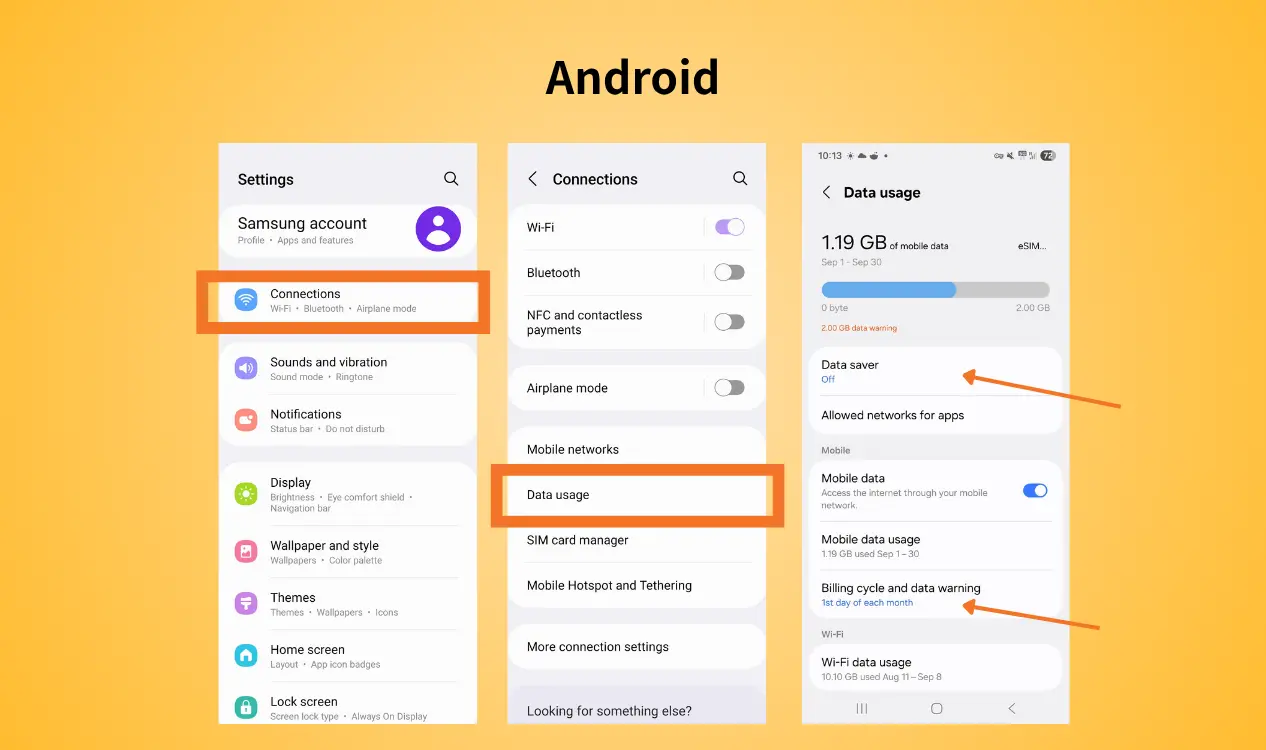
Samsung also provides a breakdown of individual Android app data usage, allowing you to identify the highest data usage app for Android. You can adjust the apps’ data settings for the top data-hungry apps.
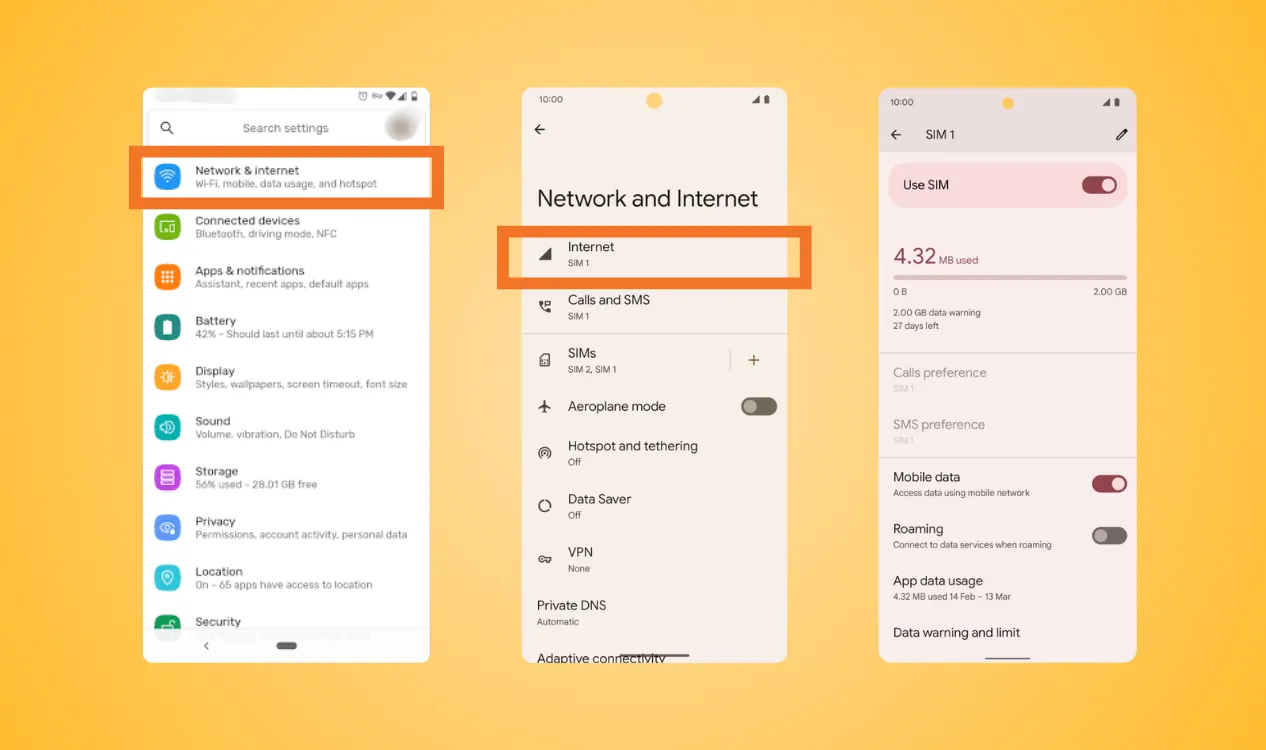
On Google Pixel:
- Open Settings → Tap Network & Internet
- Select SIMs or Internet
- Look for App data usage or Data usage
How to Check How Much Data You Have Left Android?
You can only view data usage Android and tell how much data you have used, but it does not always tell you exactly how much data remains in your plan. To make Android’s tracking easier to compare with your actual plan, you can adjust the cycle of mobile data on android to match your carrier’s billing period.
Depending on your device:
- Open Data Usage settings
- Select the option to adjust the billing cycle or reset usage
- Set the start date to match your carrier’s billing period
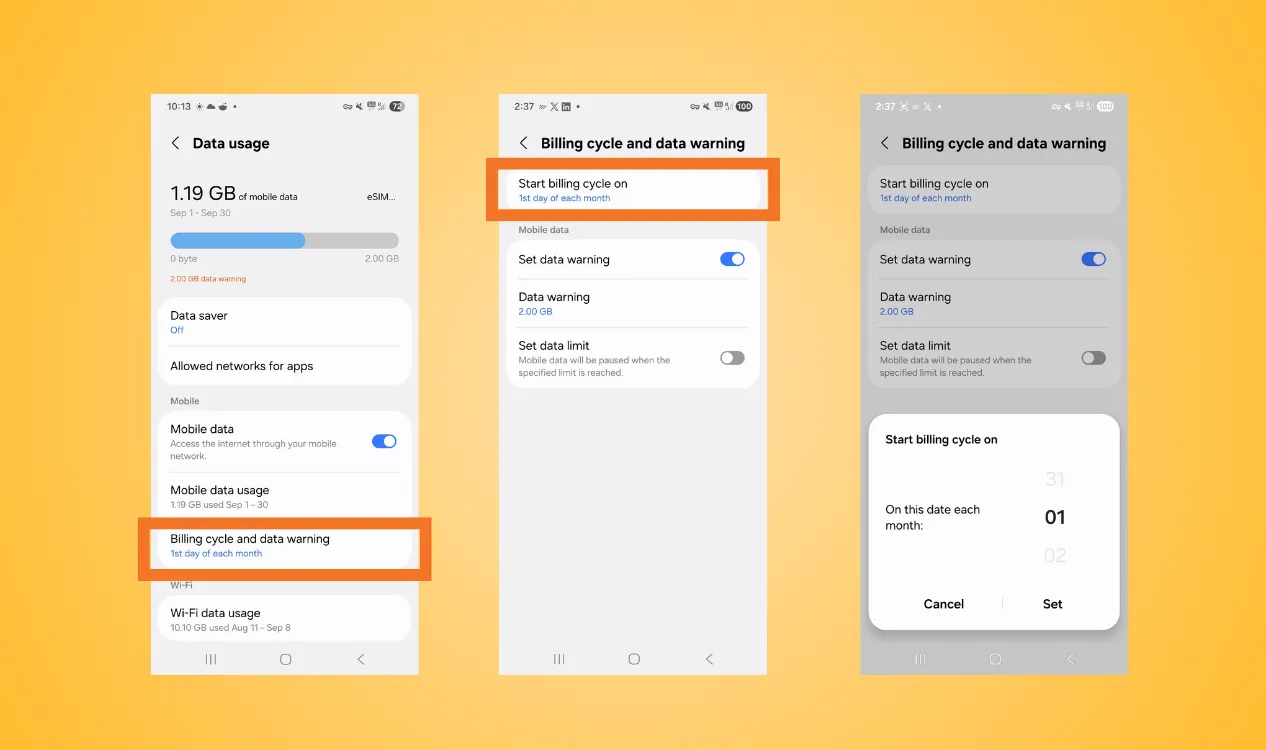
The other way is to check from your carrier’s official app. For NPN Travel eSIM, you can view data usage Android in detail of your data plan.
How to Lower Data Usage Android?
If you frequently reach your data limit, simply checking data usage on Android may not be enough. You can also change a few settings and habits to reduce unnecessary data consumption. Learn how to minimize data usage on Android with the following 5 methods.
- Turn off Background Data
- Reduce Video Resolution
- Delete Unused Apps
- Disable App Notification
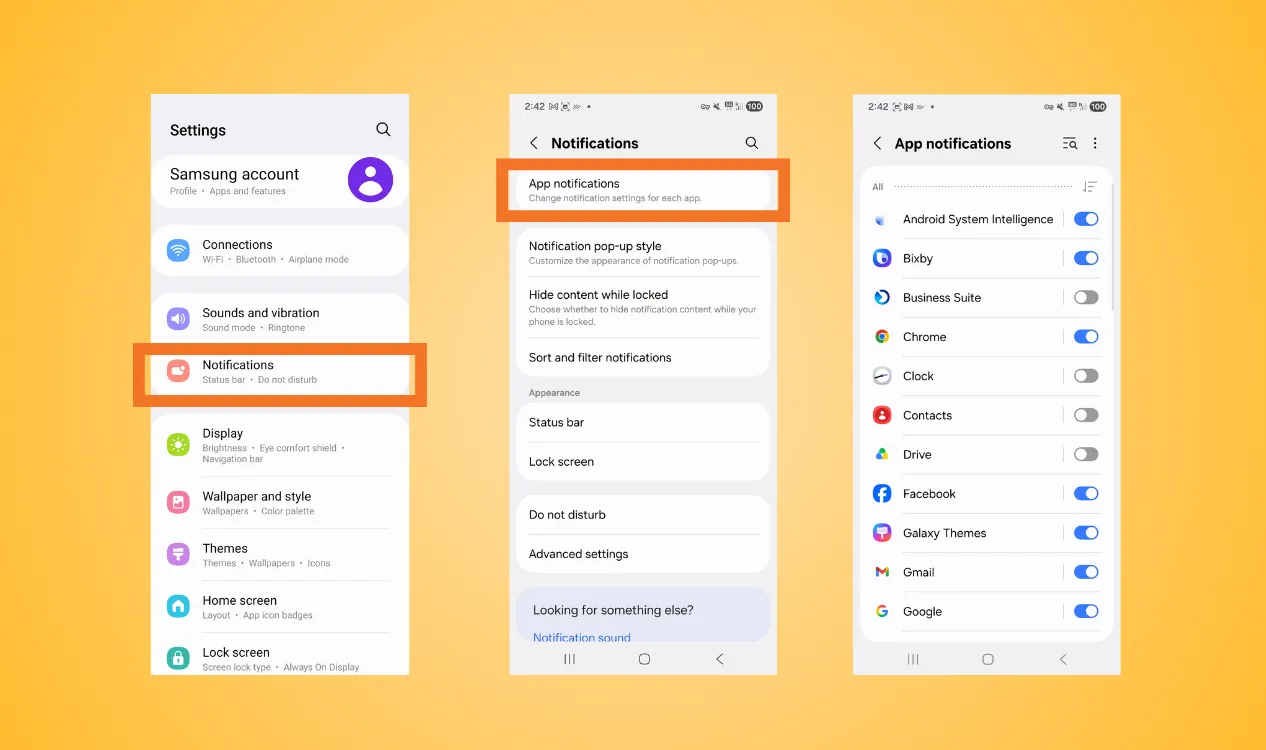
Use eSIM when you travel
Instead of check data usage Android, using your regular mobile plan while traveling internationally can result in expensive roaming charges or an unsuitable data allowance. A travel eSIM provides another option by allowing you to purchase a local or regional data plan before or during your trip.
NPN Travel eSIM is designed for travelers who want a more flexible way to stay connected overseas. It offers several advantages:
- Flexible validity: choose data plans based on your tour length
- Wide coverage: stay connected across 150+ countries and regions
- Installation: for Android, easy code scanning to insert the eSIM is provided
- Instant connectivity: turn on mobile data and data roaming to activate your eSIM after arriving at the destination
- Flexible data options: choose plan according to your expected data consumption
- No physical SIM swapping: reducing the risk of loss and theft
- 24/7 real-man customer support: get assistance if you encounter problems
Using a travel eSIM together with Android’s data monitoring features can make it easier to control your mobile data on Android. You can choose a suitable plan based on your actual usage.
Conclusion
Knowing how to check data usage in Android can help you better understand your mobile data consumption and avoid running out of data unexpectedly. Understanding how to lower data usage Android based by regularly checking which apps use the most data, adjusting your billing cycle, restricting background data and other practical methods have been clearly shown in this guide.