

How to Avoid Roaming Charges: A Stress-Free Guide for Beginners



Ever come home from a trip and find your phone bill has unexpectedly increased by hundreds or even thousands of dollars? Using calls or mobile data abroad can trigger roaming charges, leading to unexpected costs. Therefore, it is important for you to learn how to avoid roaming charges.
In this article, we’ll explore more affordable and convenient alternatives to help you stay connected while travelling, without the worry of expensive roaming fees.
- What are Roaming Charges?
- Does Data Roaming Cost Money?
- How Do You Avoid Roaming Charges?
- FAQ of How To Prevent Roaming Charges
What are Roaming Charges?
Mobile devices using a network outside your coverage area, cost of international roaming will be charged exclusively as data roaming fees by the mobile carrier.
For example, if you have a Singapore mobile plan and travel to Japan, you can open roaming to connect to the internet or make calls and SMS.
Does Data Roaming Cost Money?
Data roaming always costs money and can sometimes become surprisingly expensive. It is an additional fee to travel abroad. So that many travelers turn the roaming off during the journey.
We cannot answer the question of how much does data roaming cost as the roaming fees are dependent on destination and carrier. Generally, telecom providers charge based on the amount of data you use. However, it’s important to check their billing increments, as even a small amount of data usage may be rounded up. For example, if a carrier bills in 1 MB increments, using just 0.1 MB in a single session may still be charged as 1 MB, causing your roaming charges to add up quickly. Some providers may also charge a daily roaming fee instead.
How Do You Avoid Roaming Charges?
Why does roaming cost money even when you barely use data? Keep in mind that your phone may use data even when you’re not actively using it. Background activities and apps can also consume mobile data without you realizing it. Here’s the guide of how to prevent roaming charges.
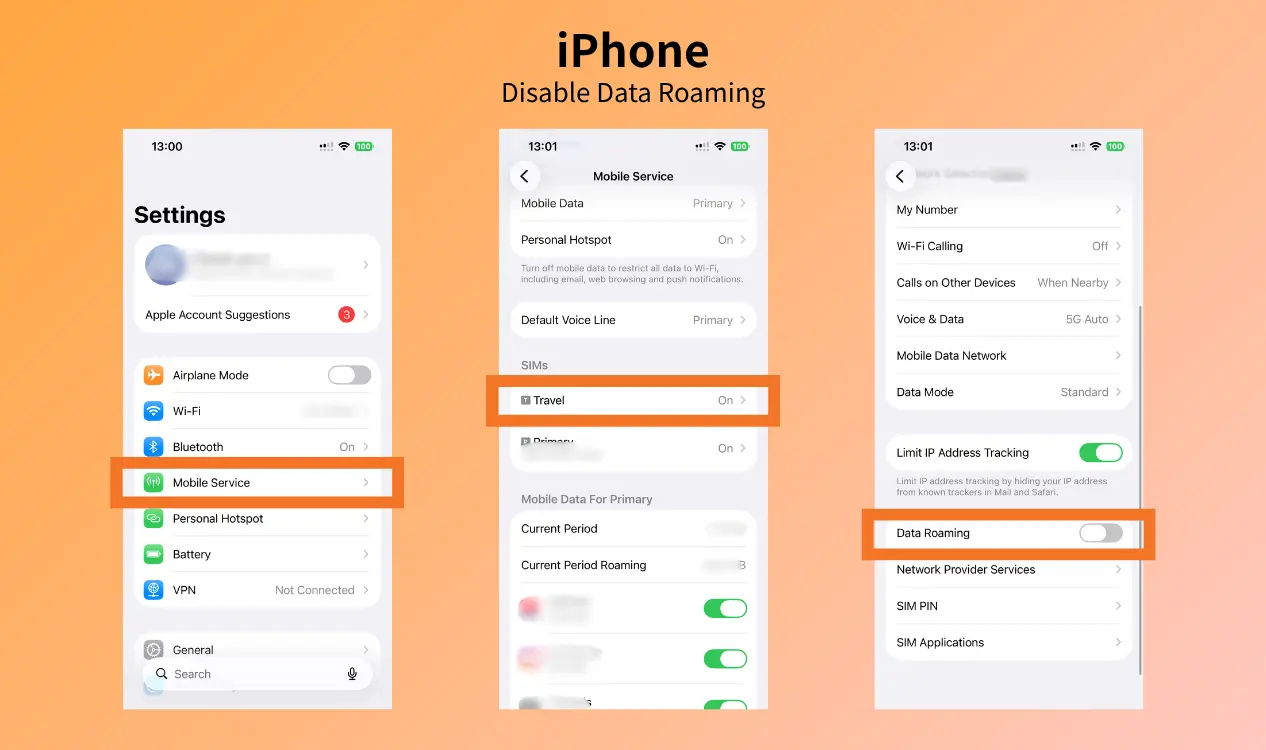
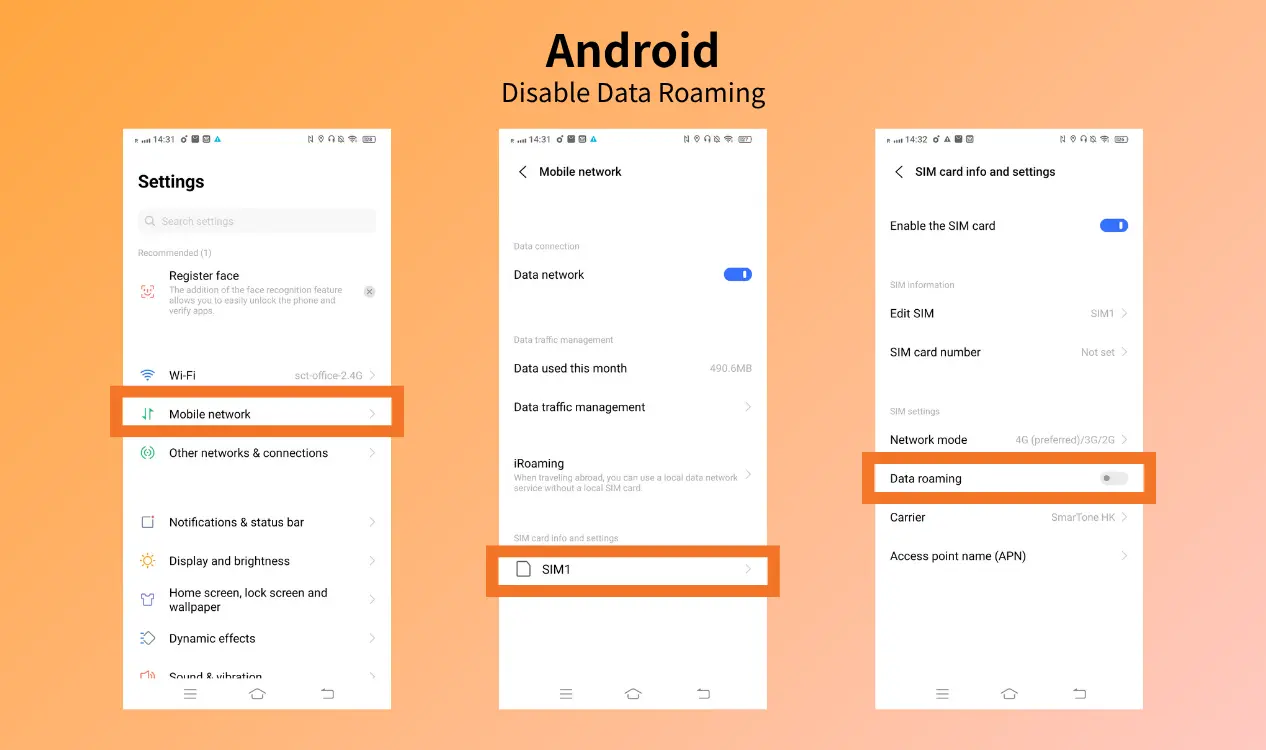
1. Disable Data roaming
The most effective way to avoid roaming charges altogether is to turn off data roaming. It’s simple to do:
[iPhone] Settings → Mobile Service → Select SIM → Roaming off
[Android] Settings → Mobile Network → SIMs → Select the active SIM → Turn off roaming
(*Named depends on model for Androids)
2. Connect to Wi-Fi
Most venues provide free Wi-Fi including hotels, restaurants, transports, etc. You are recommended to rely on public Wi-Fi networks to solve the problem of how to avoid roaming charges overseas. Once you have to give attention to security by using a VPN to avoid data snooping.
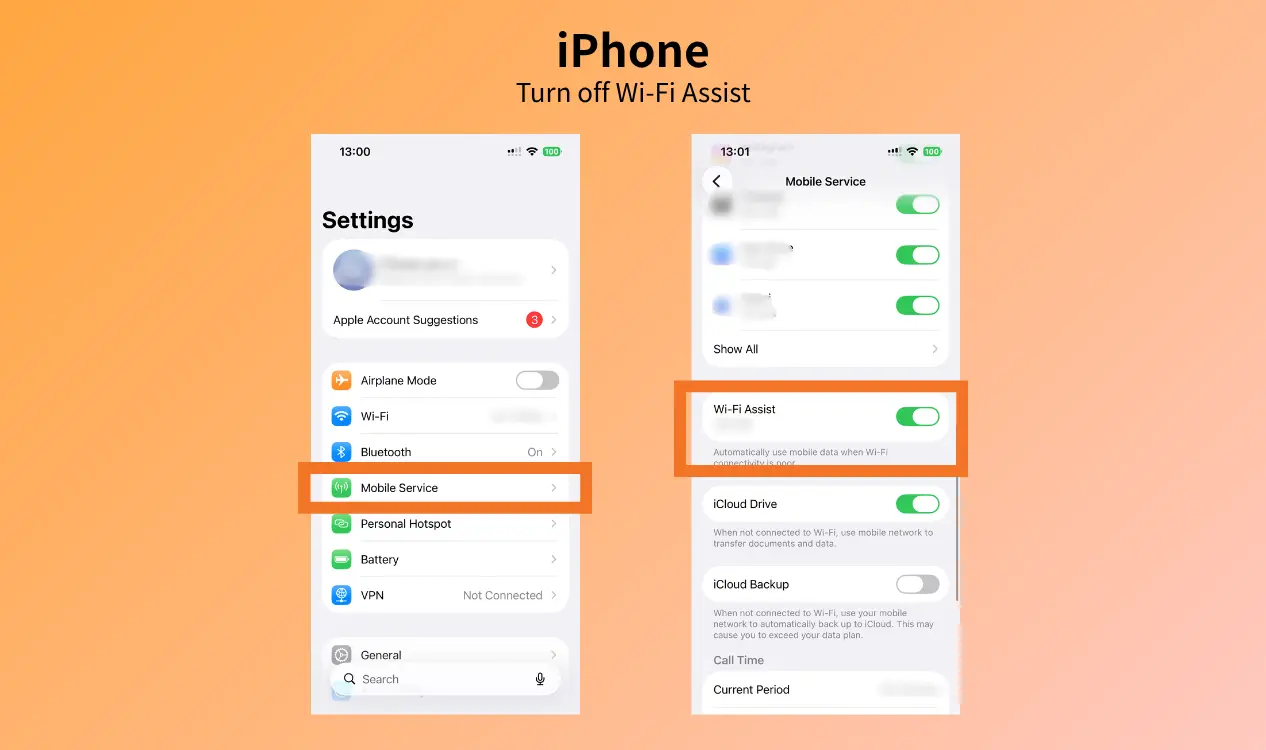
In addition, switch off the "Network Switch" to prevent your phone silently using cellular data and charge data roaming fees when the Wi-Fi signal is weak.
[iPhone] Settings → Mobile Service → Scroll to the bottom and toggle Wi-Fi Assist off
[Android] Settings → Connections → Wi-Fi → Tap the three dots in the top-right corner → Turn off the Switch to mobile data
(*Named depends on model for Androids)

3. Buy an eSIM
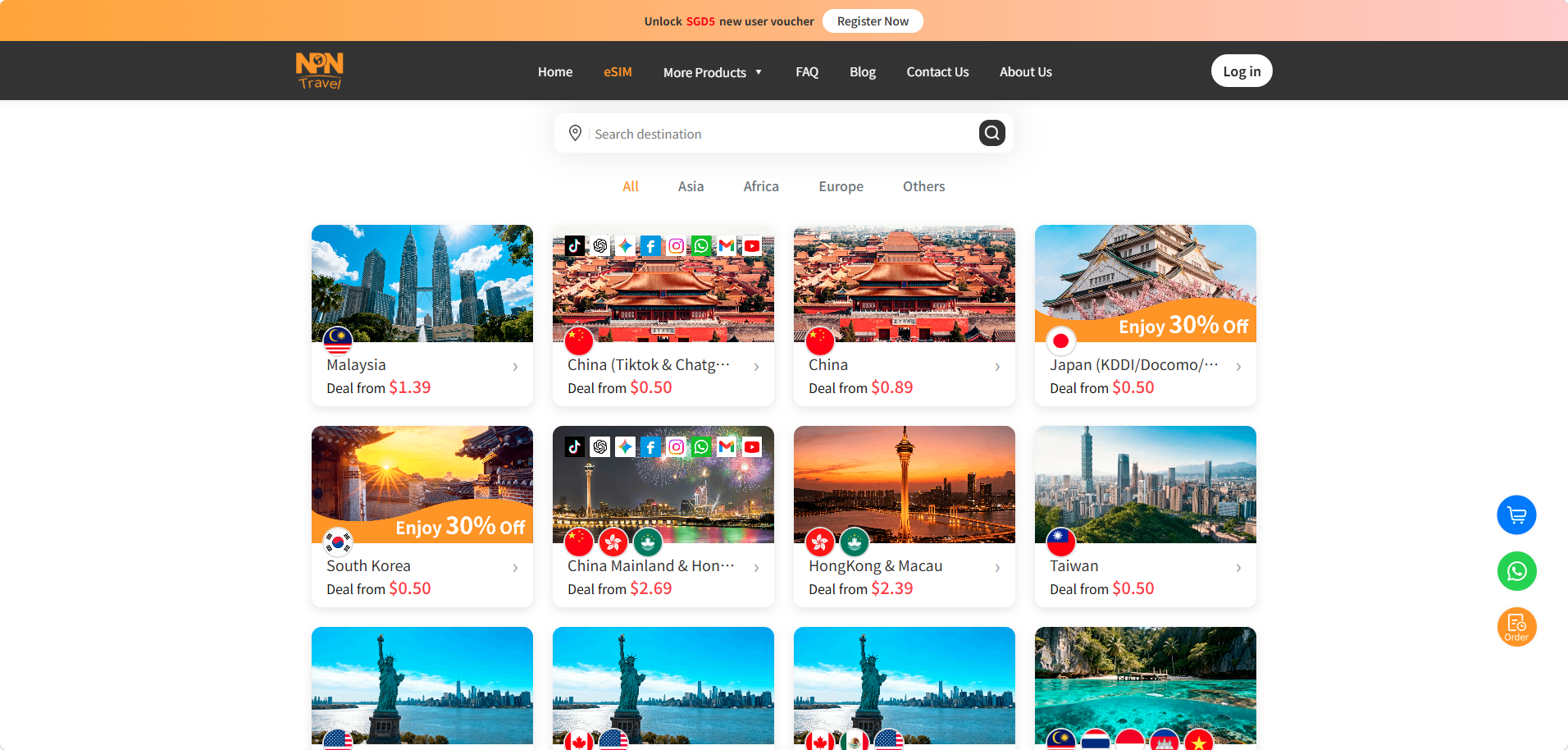
Using Travel eSIM is the best way to avoid roaming charges. By NPN Travel eSIM, you only need to purchase a suitable eSIM package and instantly connect to the mobile network after install.
Benefits with NPN eSIM:
- cover 50+ destinations with 200+ data plans
- avoid surprising data roaming charges
- flexible data plans
- 100% Digital & Zero Plastic
- 24/7 after-sales services
4. Purchase a local SIM card
If your phone is not compatible with an eSIM, a local SIM card is a choice for you. Simply insert the SIM card into your phone’s SIM card slot, and you can start using mobile data. International roaming charges will be prevented. Make sure to purchase your SIM card from a reputable source and keep it safe.
5. Activate low data mode
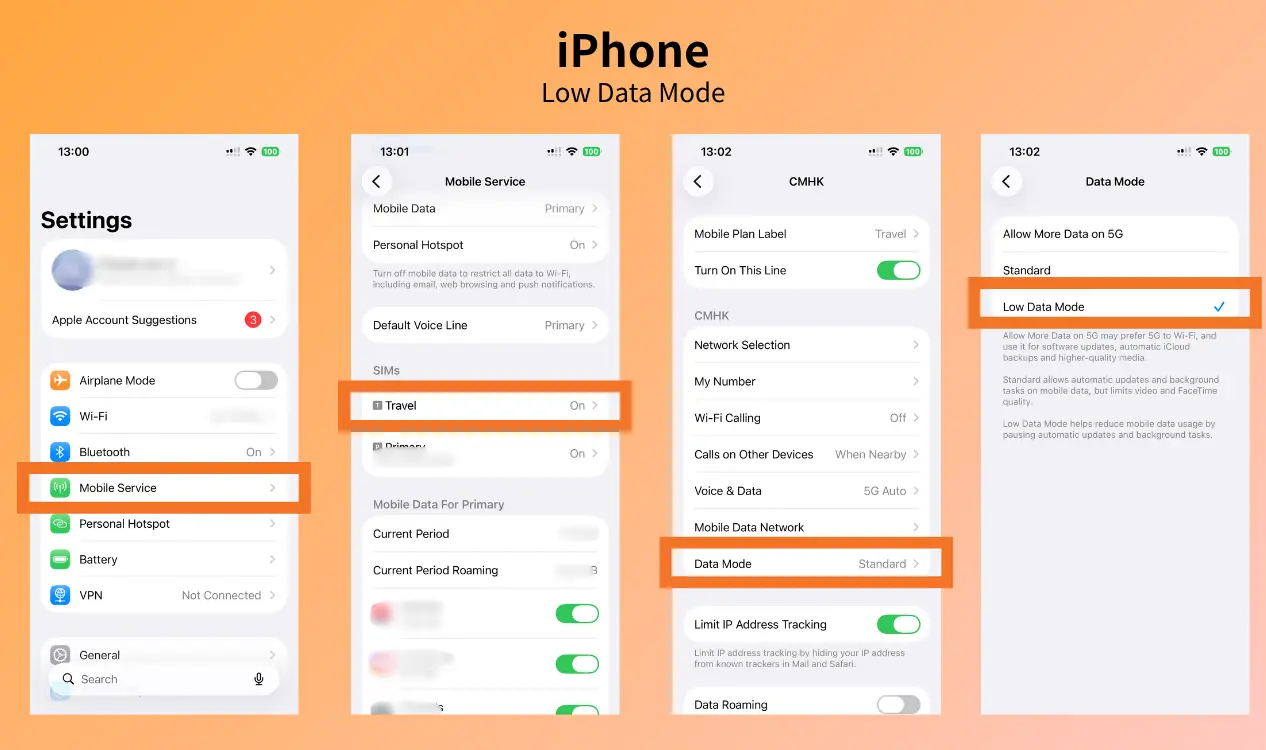
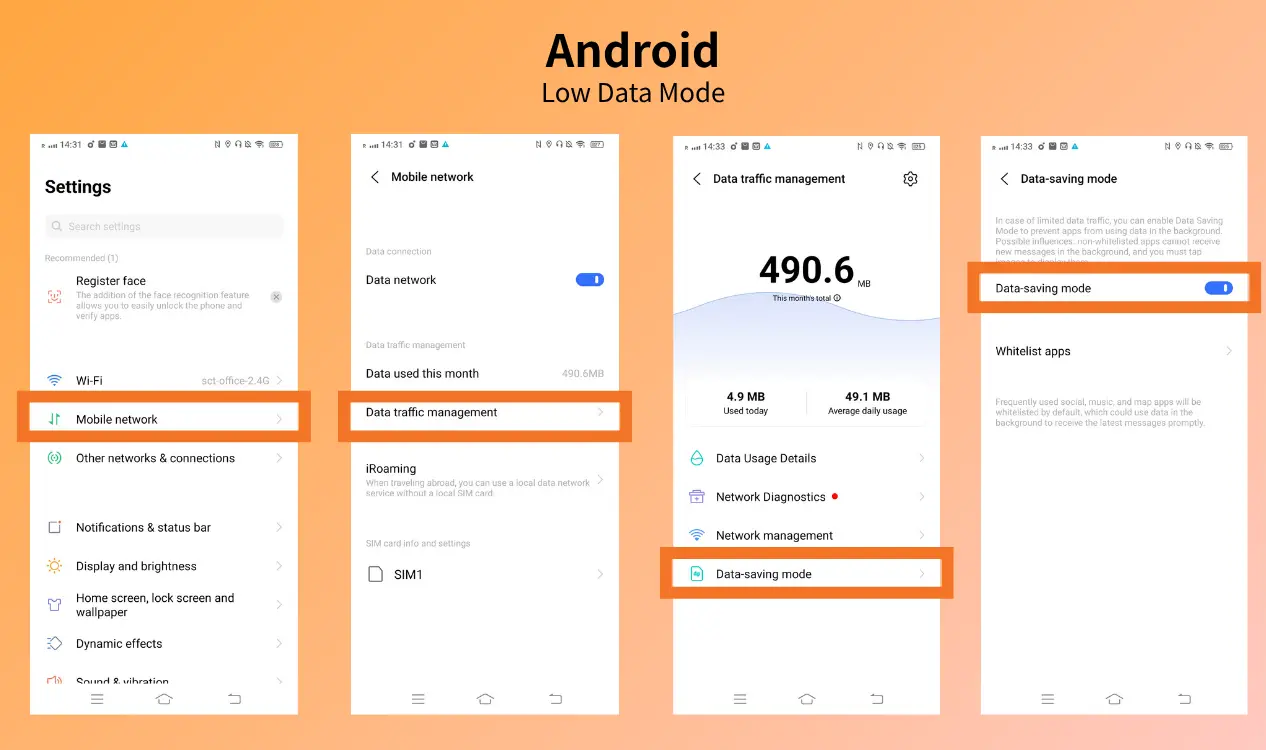
Whether you’re using roaming or a local data plan, you can turn on Low Data Mode to solve how to avoid roaming charges when travelling. This mode limits background activity and helps prevent apps from using mobile data but in Wi-Fi, helping you save data.
Operation step as below:
[iPhone] Settings → Mobile Service → Select SIM → Data Mode → Turn on Low Data Mode
[Android] Settings → Mobile Network → Data Traffic Management → Data-saving mode → Toggle the Data-saving mode on
(*Named depends on model for Androids)
FAQ of How To Prevent Roaming Charges
What is the best way to avoid roaming charges?
Purchasing an eSIM or SIM data plan is the best way to avoid roaming charges when travelling. Turn roaming off and try NPN Travel eSIM for your next trip with a smoothie network and low cost.
Does turning on airplane mode stop roaming charges?
Yes, turning on airplane mode means to restrict tracking or charge from your carrier’s cell towers.You can 100% avoid high data roaming fees.All cellular radios including data, call, and SMS will be disabled during the airplane mode.
Can you still text if you turn off data roaming?
Yes, sending and receiving standard SMS text is still available in roaming off mode. Data roaming and text roaming do not need mobile data in the same way. SMS sent through a messaging network instead of the internet. Generally, free receiving and charged outgoing text for most carriers.
Will I be charged for roaming if I use Wi-Fi?
No, internet traffic on Wi-Fi will entirely bypass the data network. Therefore, data roaming fees will not be charged during Wi-Fi. Stop the “network switch” option to prevent data consumption if the Wi-Fi signal is too weak to use.
Conclusion
Knowing how to avoid roaming charges can help you stay connected while travelling without unexpectedly roaming charges. The simplest approach is to consider a travel eSIM or SIM card for affordable mobile data.
NPN Travel eSIM lets you manage your data digitally and stay connected across multiple destinations. With the proper preparation, you can enjoy your trip with less stress and no need to worry about data roaming fees.


