How to Check Data Usage Effectively: 2026 Updated Tutorial



Mobile data keeps you connected wherever you are, especially when traveling. However, streaming videos, using social media, navigating with maps, and downloading files can quickly consume your data.
Knowing how to check data usage allows you to monitor your consumption, understand which apps use the most data, and avoid running out of data unexpectedly.
In this guide, we'll show you a tutorial of check data usage, explain why your phone may be using more data than expected, and share how using an eSIM can help you manage your mobile data while traveling.
- Common Concerns to Check Data Usage
- How to Check Data Usage on iPhone?
- How to View Data Usage on Android?
- Use eSIM to Reduce Data Usage on My Phone
Common Concerns to Check Data Usage
Before getting into the operation part, it’s helpful to understand why your data may be running out faster than expected and how to know my data usage in general. Here are two common questions travelers often have about data usage checker.
1. Why am I using so much data?
If your mobile data seems to be disappearing quickly, certain apps and activities may be responsible. Video streaming, social media, video calls, automatic app updates, cloud backups, and navigation can all consume a significant amount of mobile data. Some apps may also continue using data in the background even when you’re not actively using them.
Check your data usage can help you identify which apps are consuming the most data so you can adjust their settings accordingly. In my experience, Youtube, TikTok and online gaming apps usually have higher data consumption.
2. How to know how much data you have left?
In general, it can only check data used on iPhone roughly, and data consumption on Android can be directly shown on your phone settings. However, your data usage checker may not have the same calculation as your carrier or eSIM provider on the data allowance.
Therefore, if you are using a limited data plan, check your data usage on both your phone and your provider’s app to get a more accurate idea of how your Android or iPhone data consumption. We will get in details soon.
How to Check Data Usage on iPhone?
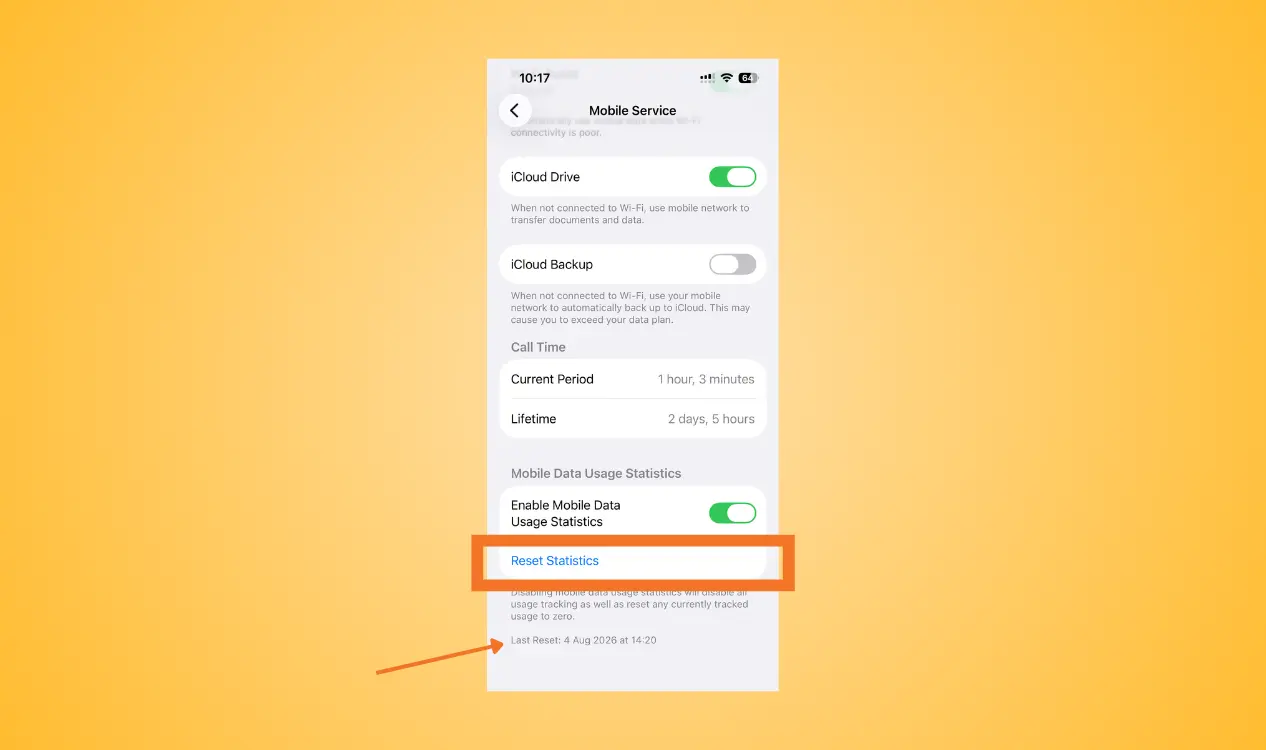
Checking iPhone data usage just takes a few steps.
- Step 1: Open Settings
- Step 2: Tap Mobile Service
- Step 3: Scroll down to the Cellular Data
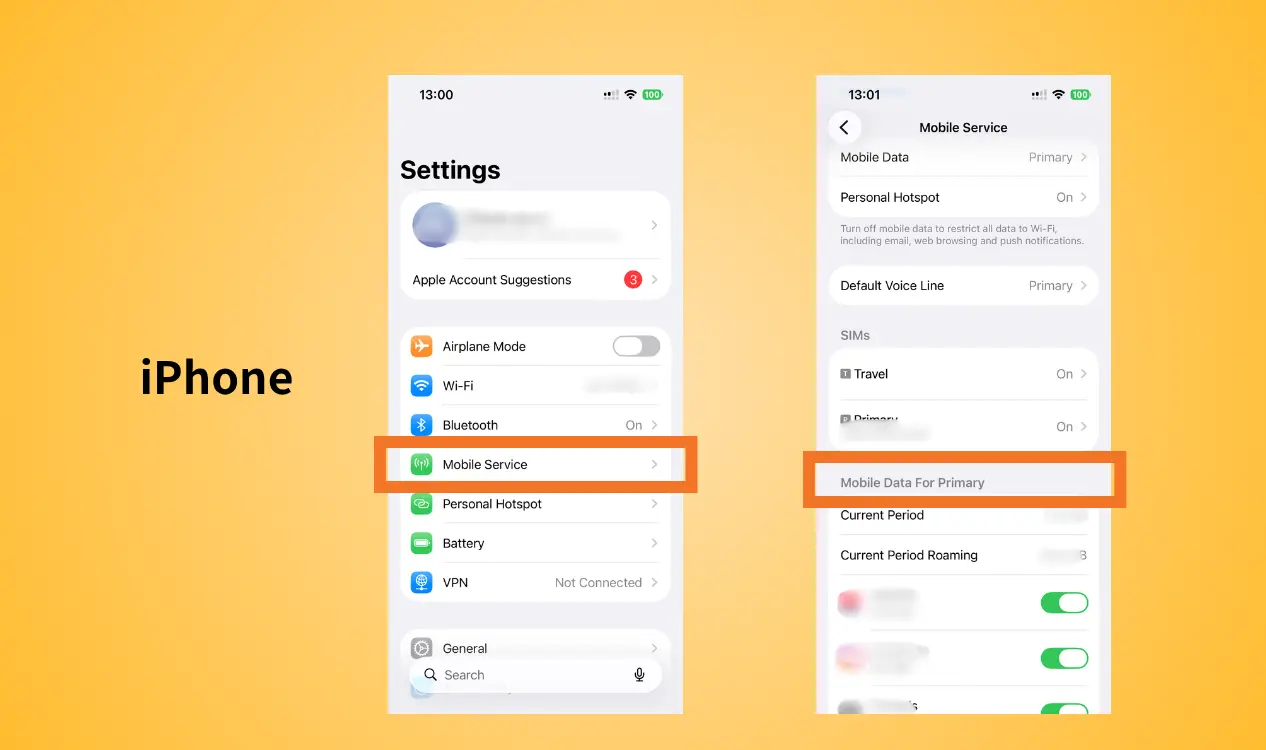
Here, show data usage iPhone based on the current tracking period. If tracking data usage on iPhone during a specific trip or billing period is needed, scroll to the bottom and tap reset statistics.
How to View Data Usage on Android?
Android phones may have slightly different menus to check mobile data on Android depending on the manufacturer and Android version.
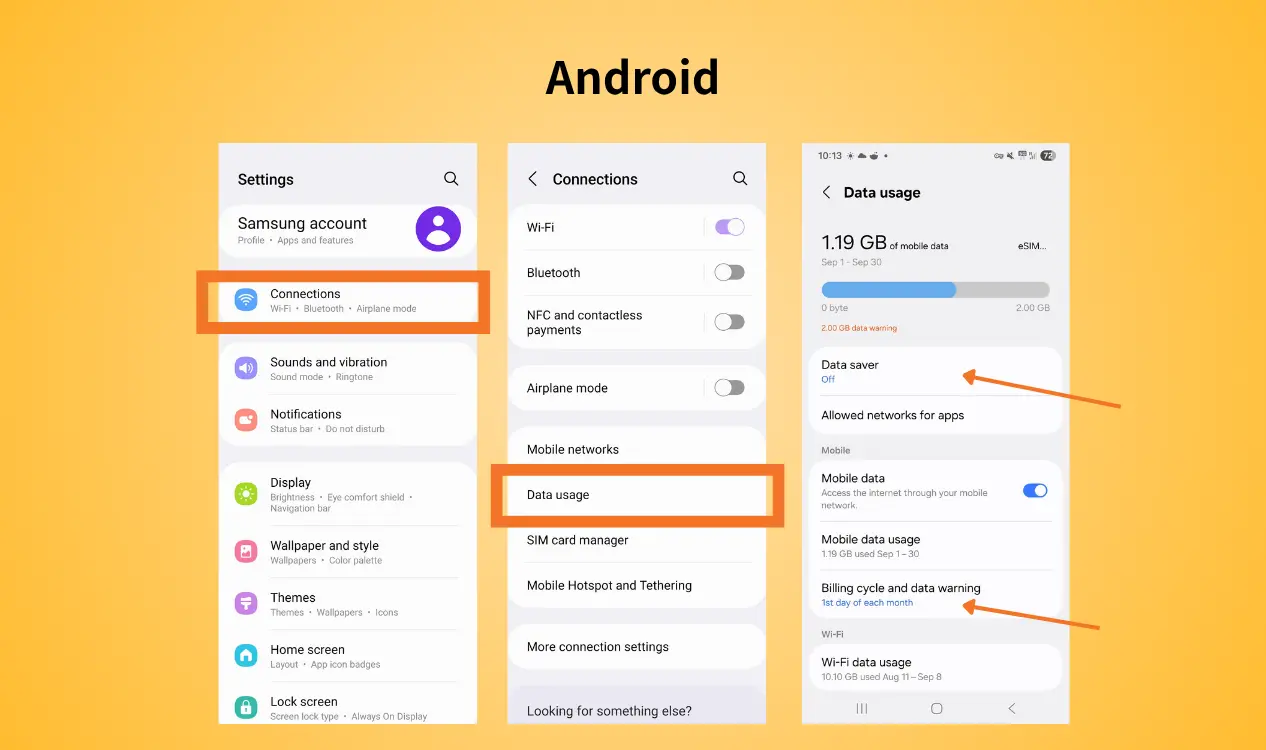
Generally, you can find your mobile data usage Android by going to:
- Step 1: Settings
- Step 2: Go to Connections
- Step 3: Tap Data Usage
Android show data usage on a monthly basis. You can set your own cycle based on your bill date. Data warning or data limit can also be setted on many Android phones to prevent you from accidentally using more data than our plan allows.
Use eSIM to Reduce Data Usage on My Phone
A travel eSIM allows you to purchase a local or regional data plan before or during your trip, so you can better control your mobile data costs. Therefore, choosing the right data plan and frequently “check my data” during travel is important.
For example, NPN Travel eSIM allows travelers to choose different durations and data plans based on their travel needs. Instead of relying on expensive roaming, you can use a dedicated travel data plan when you arrive at your destination.
Here are some significant advantages from NPN Travel review:
- Flexible plan options
- Easy activation
- Avoid expensive roaming
- Stay connected
- Easily check data usage
With a suitable travel eSIM, you don’t have to constantly worry about whether your regular mobile plan will generate unexpected roaming charges. You can simply choose a suitable data plan before your trip and keep track your data usage when necessary.
Conclusion
Knowing how to check data usage can help you better understand your mobile data consumption, identify data-hungry apps, and avoid running out of data unexpectedly.
For travelers, choosing a right travel eSIM like NPN Travel eSIM can help you stay connected and keep mobile data costs under control. Enjoy a more convenient and worry-free travel experience by combining regular check of check data usage with a suitable eSIM plan.